Roblox shirt template
A Roblox classic clothing template is a 585×559 pixel PNG. Only 18 rectangles on it reach the avatar — 147,456 pixels, 45.1% of the sheet. The other 54.9% never renders on the body at all, and a 2px gutter separates every face, which is why edges fray at distance when artwork stops short of it.
Download the official templates. Shirt template (PNG) · Pants template (PNG). Roblox accepts PNG or JPG, but keep yours PNG: JPG has no alpha channel, so every transparent part of the template turns solid white and the unpainted areas of the garment stop showing skin.
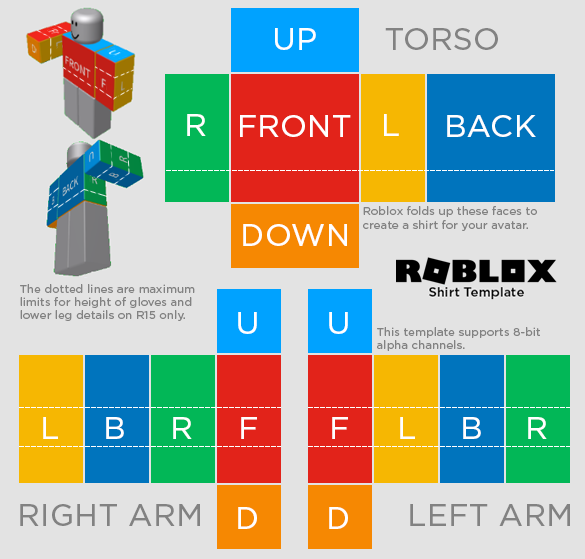
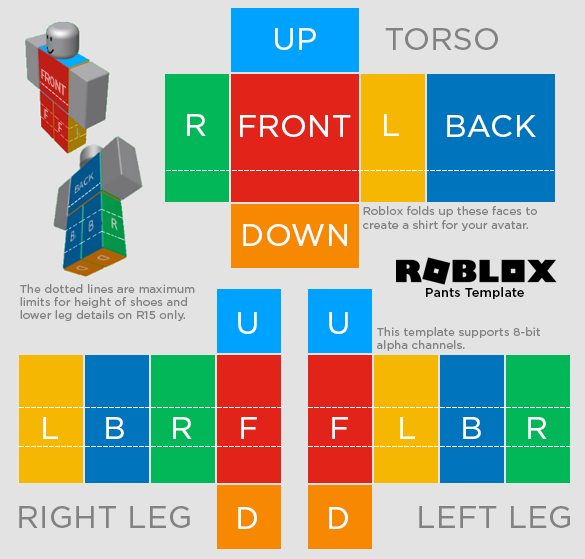
The numbers
| Canvas | 585 × 559 pixels (327,015 total) |
|---|---|
| Format | PNG, 8-bit alpha supported |
| Face regions | 18 |
| Pixels that reach the avatar | 147,456 (45.1%) |
| Pixels that never render | 179,559 (54.9%) |
| Gutter between faces | 2 pixels |
| Region sizes used | 128×128, 128×64, 64×128, 64×64 pixels |
Why more than half of it never shows
The sheet is a net: a flat arrangement of the six faces of the torso and the six of each limb, folded onto boxes. Nets do not tile a rectangle, so the space between the arms of the cross is simply unused. Painting there is not a mistake — nothing happens. It is 179,559 pixels of the file that the avatar never samples.
That dead space is also the only safe place to put anything you do not want on the garment, which is what this editor uses for an opt-in attribution mark.
The 2px gutter, and why seams fray
Every face is separated from its neighbour by 2 pixels of unpainted template. Roblox samples the texture with filtering, and at distance a sample near an edge mixes in whatever sits just past it. If your artwork stops exactly at the edge of a face, what it mixes with is transparency — and the seam reads as a pale fringe on the avatar.
The fix is to bleed artwork into the gutter rather than stopping at the boundary. This editor does that on export.
The limb strips are not mirror images
The most common wrong assumption about this template, and the reason hand-mirrored sleeves come out scrambled. The two limb strips carry their four side faces in different orders:
| Right limb strip | left · back · right · front |
|---|---|
| Left limb strip | front · left · back · right |
The left strip is the right strip rotated by one position, not flipped. Mirroring one onto the other pixel-for-pixel puts the front of a sleeve where its side should be.
Every region, exactly
| Face | Id | x, y | Size | Pixels |
|---|---|---|---|---|
| Torso up | torso.up | 231, 8 | 128×64 | 8,192 |
| Torso right | torso.right | 165, 74 | 64×128 | 8,192 |
| Torso front | torso.front | 231, 74 | 128×128 | 16,384 |
| Torso left | torso.left | 361, 74 | 64×128 | 8,192 |
| Torso back | torso.back | 427, 74 | 128×128 | 16,384 |
| Torso down | torso.down | 231, 204 | 128×64 | 8,192 |
| Right arm / leg up | rightLimb.up | 217, 289 | 64×64 | 4,096 |
| Right arm / leg left | rightLimb.left | 19, 355 | 64×128 | 8,192 |
| Right arm / leg back | rightLimb.back | 85, 355 | 64×128 | 8,192 |
| Right arm / leg right | rightLimb.right | 151, 355 | 64×128 | 8,192 |
| Right arm / leg front | rightLimb.front | 217, 355 | 64×128 | 8,192 |
| Right arm / leg down | rightLimb.down | 217, 485 | 64×64 | 4,096 |
| Left arm / leg up | leftLimb.up | 308, 289 | 64×64 | 4,096 |
| Left arm / leg front | leftLimb.front | 308, 355 | 64×128 | 8,192 |
| Left arm / leg left | leftLimb.left | 374, 355 | 64×128 | 8,192 |
| Left arm / leg back | leftLimb.back | 440, 355 | 64×128 | 8,192 |
| Left arm / leg right | leftLimb.right | 506, 355 | 64×128 | 8,192 |
| Left arm / leg down | leftLimb.down | 308, 485 | 64×64 | 4,096 |
Design on it in your browser. Roblox Clothes Maker paints straight onto these regions with a live 3D preview, mirrors across matching faces, and handles the gutter for you. Open the editor.